> For the complete documentation index, see [llms.txt](https://help.blotato.com/llms.txt). Markdown versions of documentation pages are available by appending `.md` to page URLs; this page is available as [Markdown](https://help.blotato.com/support/dm-automations.md).

# DM Automations

DM Automations send an Instagram or Facebook direct message when someone comments on your content or sends your account a message. You manage automations in the Blotato web app or through an AI tool connected to Blotato MCP. DM Automations are available on every paid plan.

An automation sends one message by default. Three optional steps extend it: a follow gate holds the message back until the person follows your Instagram account, an email gate holds it back until they reply with an email address, and a webhook calls your own endpoint once the message goes out. Blotato runs them in a fixed order: follow gate, email gate, your message, webhook. See [DM Automations](/features/dm-automations.md) for the full walkthrough.

## Supported Platforms

* Instagram
* Facebook Pages

Blotato does not support SMS, WhatsApp, or other messaging channels for DM Automations.

Reconnect accounts added before messaging/comments/follow gating launched so Blotato receives the required messaging permissions.

* [Connect Instagram](/settings/social-accounts/instagram.md)
* [Connect Facebook](/settings/social-accounts/facebook.md)

## Using the Blotato Web App

1. Open [DM Automations](https://my.blotato.com/dm-automations).
2. Create a new automation.
3. Select an Instagram account or Facebook Page.
4. Choose a comment-received or message-received trigger.
5. For a comment trigger, choose one specific post or every post.
6. Add the keywords or phrases that trigger the automation. Leave the field empty to match any text.
7. Write the direct message.
8. If you want recipients to open a link, add up to three link buttons with a button label and web URL. Skip this step for a text-only message or an email-to-webhook flow.

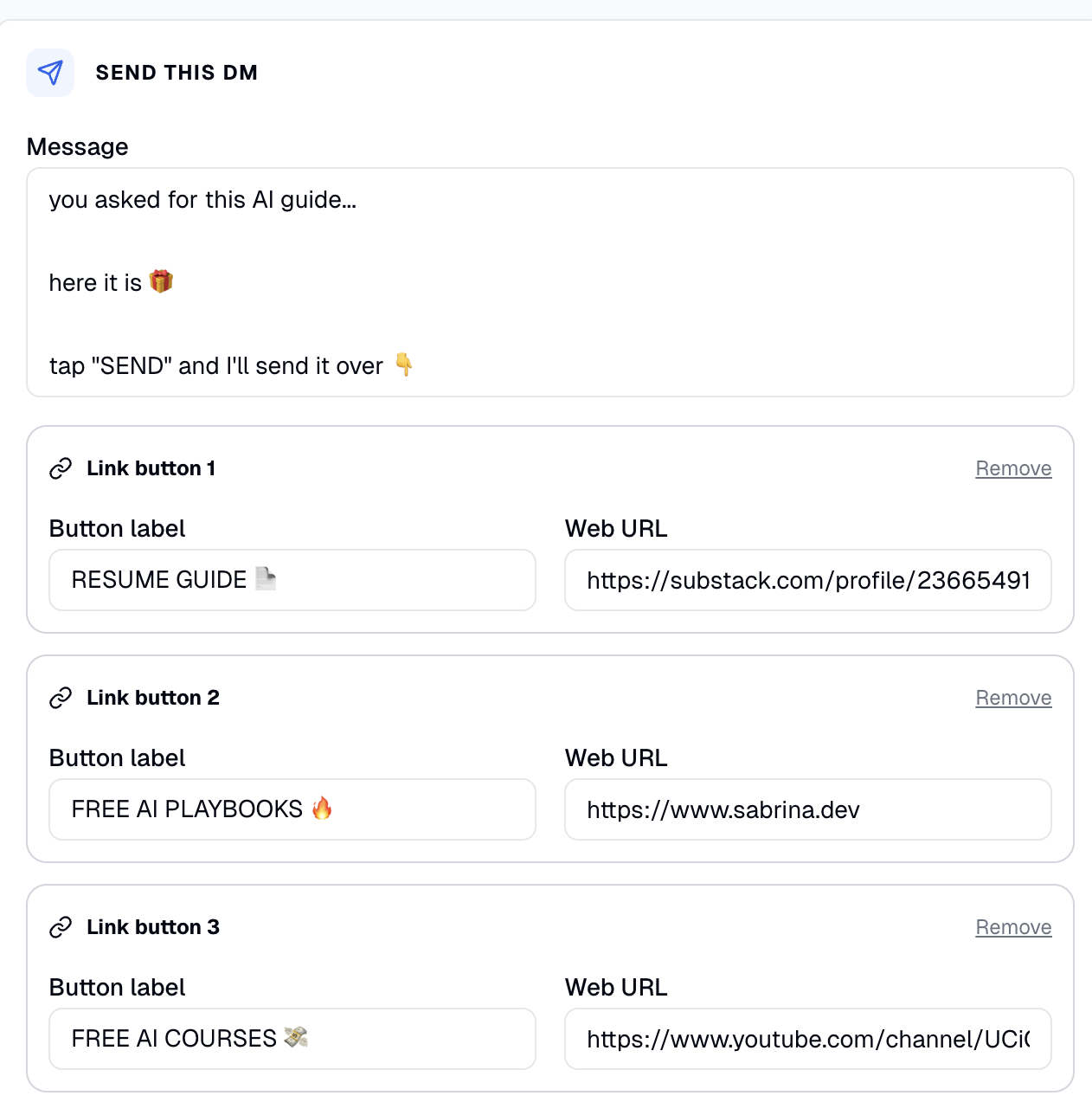
   The web app pre-fills each link button with a sample label and URL. Replace both with your own — for example, a lead-magnet download, landing page, or artifact link.

   <figure><img src="/files/AI6XGM1L3pAYjtCVO22t" alt="DM Automation editor showing three link buttons pre-filled with sample labels and URLs to be replaced"><figcaption><p>Link buttons come pre-filled with sample values. Replace the label and URL in each one with your own link.</p></figcaption></figure>

   Link buttons are optional. The button label is the text a recipient sees, and the Web URL is the page the button opens. Click **Remove** beside a link button to delete it. The Web URL is separate from the Webhook URL that sends automation data to your endpoint.

   **For Instagram, buttons only show in the Instagram mobile app.** Someone reading your DM on instagram.com in a desktop browser sees the message text with no buttons under it. Instagram sets this behavior, and no Blotato setting changes it. To work around this issue, you can add the URL directly in the message text, and Instagram will render it as a clickable link.

   **For Instagram, use a button or a plain-text URL, not both.** A message carrying both leaves the URL unclickable on desktop, so a desktop reader ends up with no working link at all. Keep the button for a mostly mobile audience. For a mostly desktop audience, remove the button and put the URL in the message text instead.
9. For Instagram, turn on **Ask for a follow** to hold the message back until the person follows you. Write the gate message and the button label, up to 20 characters. Facebook automations reject a follow gate. Reconnect the account first if you connected it before DM automations and follow gating landed, and ask for a typed reply in the gate message so desktop readers advance without a button.
10. Turn on **Ask for an email address** to hold the message back until the person replies with an email. Write the gate message. Blotato saves the first email address in their reply to the contact.
11. Turn on **Call a webhook** to notify your own system once the message goes out. Pick the method, enter a public `http(s)` URL, and add any headers your endpoint needs.
12. Activate the automation.
13. Review its triggered, completed, and failed totals.

Someone who never answers a gate leaves the run open for 1 hour, then the run ends as expired. Expired runs count toward triggered and toward neither completed nor failed. Blotato delivers a captured email address through the webhook body, and the Blotato inbox and Messages API do not show it.

<figure><img src="/files/jmm6fYOezrI80TpVtPEz" alt="Blotato DM Automation editor showing a comment keyword trigger, direct message, link buttons, and automation statistics"><figcaption><p>Create and review a DM Automation in the Blotato web app.</p></figcaption></figure>

Keywords ignore upper and lower case and match whole words. `PRICE` matches `price`, while `price` does not match `pricey`. The automation runs when the comment or message contains any configured keyword.

## Test a Comment Trigger

**Your own comments do not trigger a DM automation.** Test from a different Instagram or Facebook account:

1. Activate the automation.
2. Sign in to a different account.
3. Comment on the target post using one of the trigger keywords.
4. Confirm the other account receives the direct message.

## Using ChatGPT, Claude, Hermes, OpenClaw, or Another MCP Client

1. Complete the [Blotato MCP setup](/api/mcp/setup.md).
2. Start a new chat in your AI tool.
3. Ask: "Walk me through how to set up Blotato DM Automations."
4. Describe the automation you want. Include:
   * The Instagram account or Facebook Page.
   * The automation name.
   * The comment or message trigger.
   * The target post, or state that the automation applies to every post.
   * The trigger keywords.
   * The direct-message text.
   * Up to three link-button labels and URLs.
   * A follow gate for Instagram, with its message and button label.
   * An email gate, with its message.
   * A webhook, with its method, URL, and headers.

Your AI tool works with Blotato MCP to create, update, list, activate, deactivate, and archive DM Automations, including the follow gate, the email gate, and the webhook. It also retrieves automation analytics, execution runs, and logs.

Follow [Turn One Comment Into a CRM Lead](/features/dm-automations.md#example-turn-one-comment-into-a-crm-lead) for a complete comment-to-DM example with email capture, a CRM webhook, copy-and-paste prompts, and testing steps.

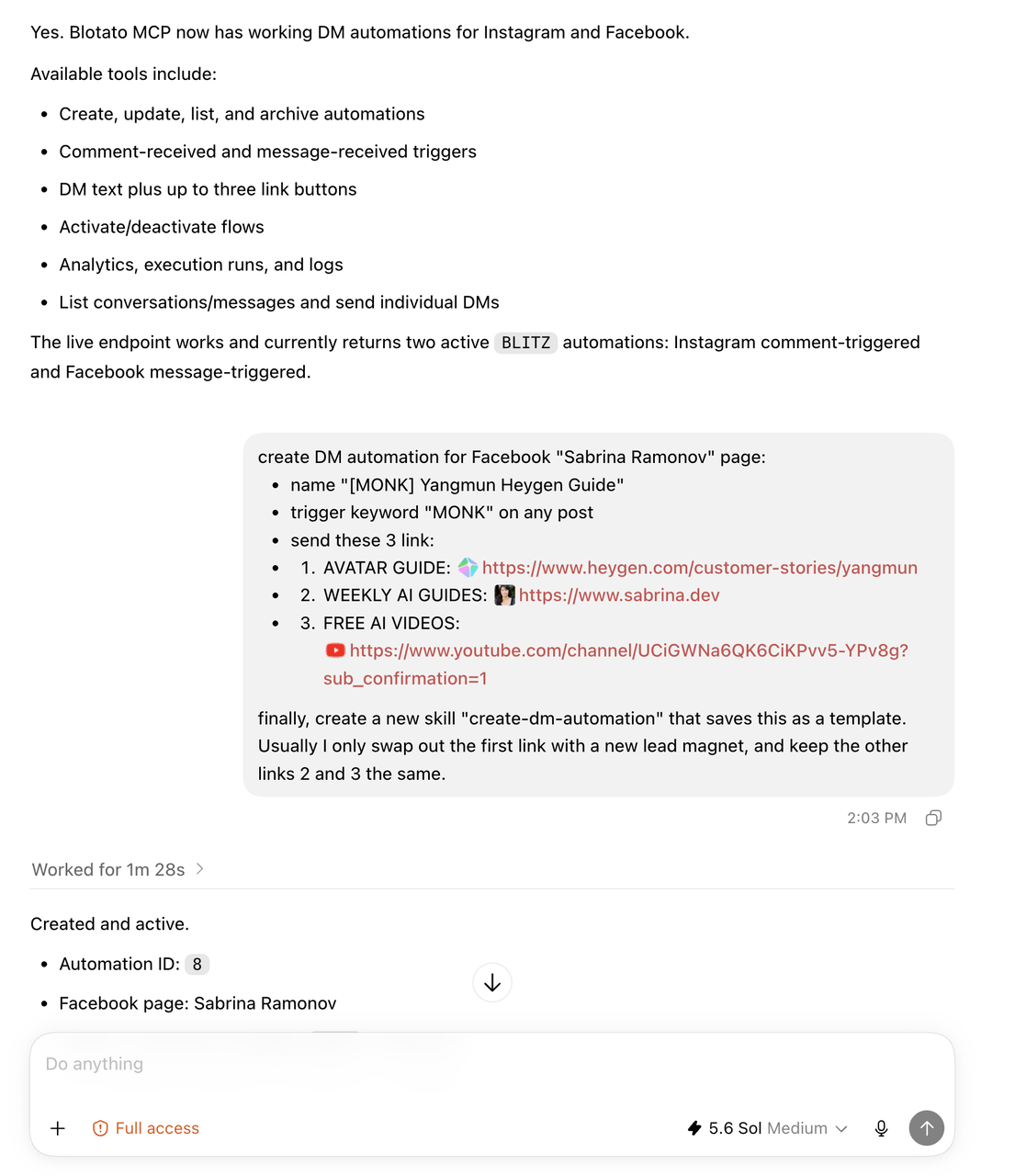
<figure><img src="/files/gHEvtLWwTPbTFJjQf7r3" alt="Claude creating and activating a Facebook DM Automation through Blotato MCP"><figcaption><p>Describe the trigger, message, and links to create a DM Automation with Claude.</p></figcaption></figure>

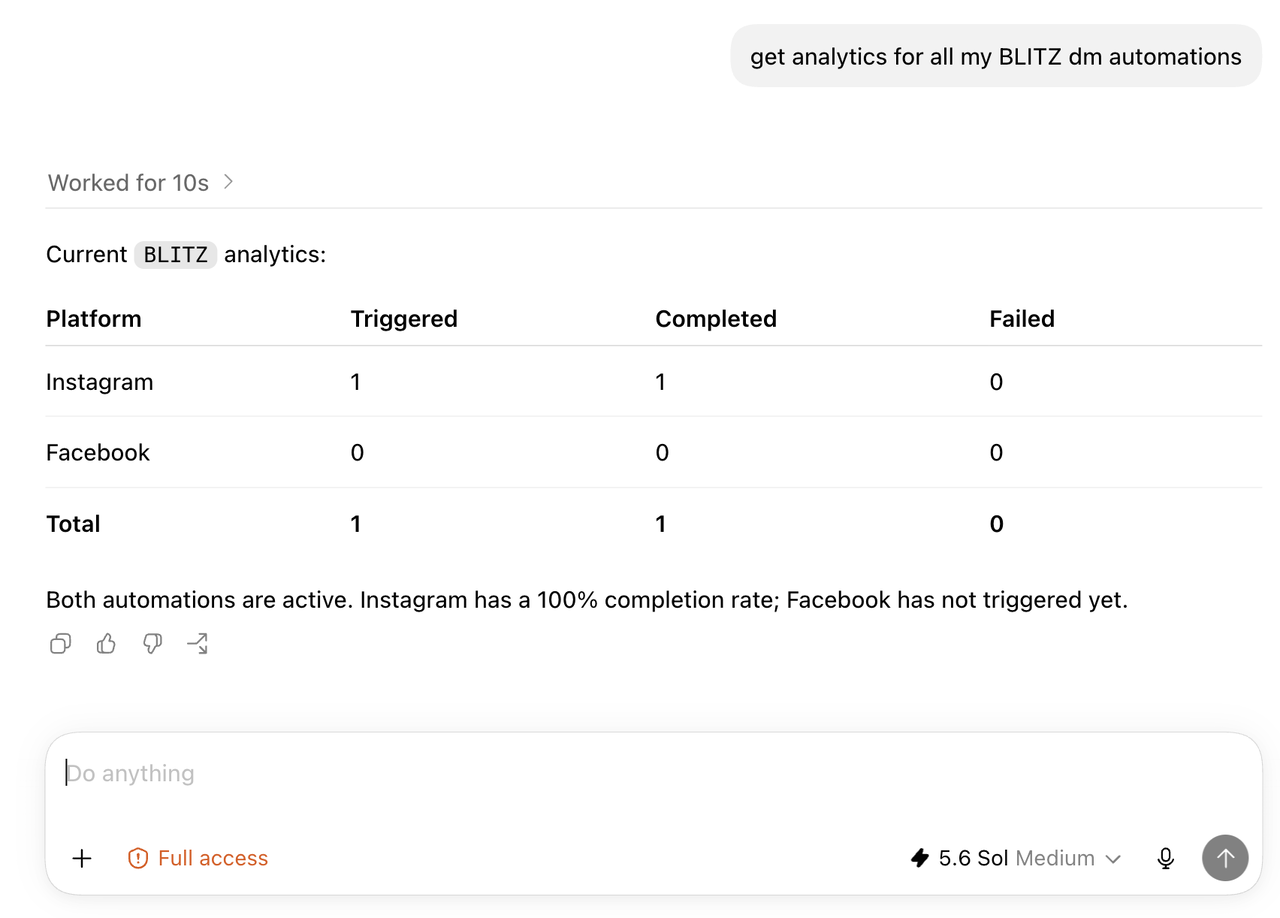
To review performance, ask your AI tool for analytics for one automation or a group of automations. The response includes triggered, completed, and failed totals by platform.

<figure><img src="/files/YO9VfbnOvTQ42yojpKmA" alt="Claude showing Instagram and Facebook DM Automation analytics from Blotato"><figcaption><p>Retrieve DM Automation analytics through Claude.</p></figcaption></figure>

## Active Contacts

Each new person reached through a DM Automation counts toward your plan's monthly active-contact limit. Each contact is unique within one connected social account. If the same person interacts with two connected Facebook Pages, they count as two active contacts. Reaching the same person again through the same connected account during the monthly window does not add another contact.

An automation with a follow gate or an email gate sends more than one message to the same person. Those extra messages reach a contact you already counted, so the person still counts once. Gates and webhooks add no charge and consume no credits.

Deleting a conversation or automation does not reset monthly usage. The count resets at the start of the next monthly window.

See [Active Contacts](/settings/billing-and-credits.md#active-contacts) for plan limits.

## Related API Features

Use [Messages](/api/messages.md) to list conversations, read messages, send individual replies, and check delivery status. Use [Comments](/api/comments.md) to list and reply to comments.

Set the follow gate, email gate, and webhook through the API with the `followGate`, `emailGate`, and `webhook` fields on [Create DM Automation](/api/dm-automations.md#create-dm-automation).


---

# Agent Instructions
This documentation is published with GitBook. GitBook is the documentation platform designed so that both humans and AI agents can read, navigate, and reason over technical content effectively. Learn more at gitbook.com.

## Querying This Documentation
If you need additional information that is not directly available in this page, you can query the documentation dynamically by asking a question.

Perform an HTTP GET request on the current page URL with the `ask` query parameter, and the optional `goal` query parameter:

```
GET https://help.blotato.com/support/dm-automations.md?ask=<question>&goal=<endgoal>
```

`ask` is the immediate question: it should be specific, self-contained, and written in natural language.
`goal` is optional and describes the broader end goal you are ultimately trying to accomplish on behalf of the user. GitBook uses it to tailor the answer towards what is most useful for that goal.

The response will contain a direct answer to the question and relevant excerpts and sources from the documentation.

Use this mechanism when the answer is not explicitly present in the current page, you need clarification or additional context, or you want to retrieve related documentation sections.